n8n vs Zapier vs Make.com: Best Automation Platform
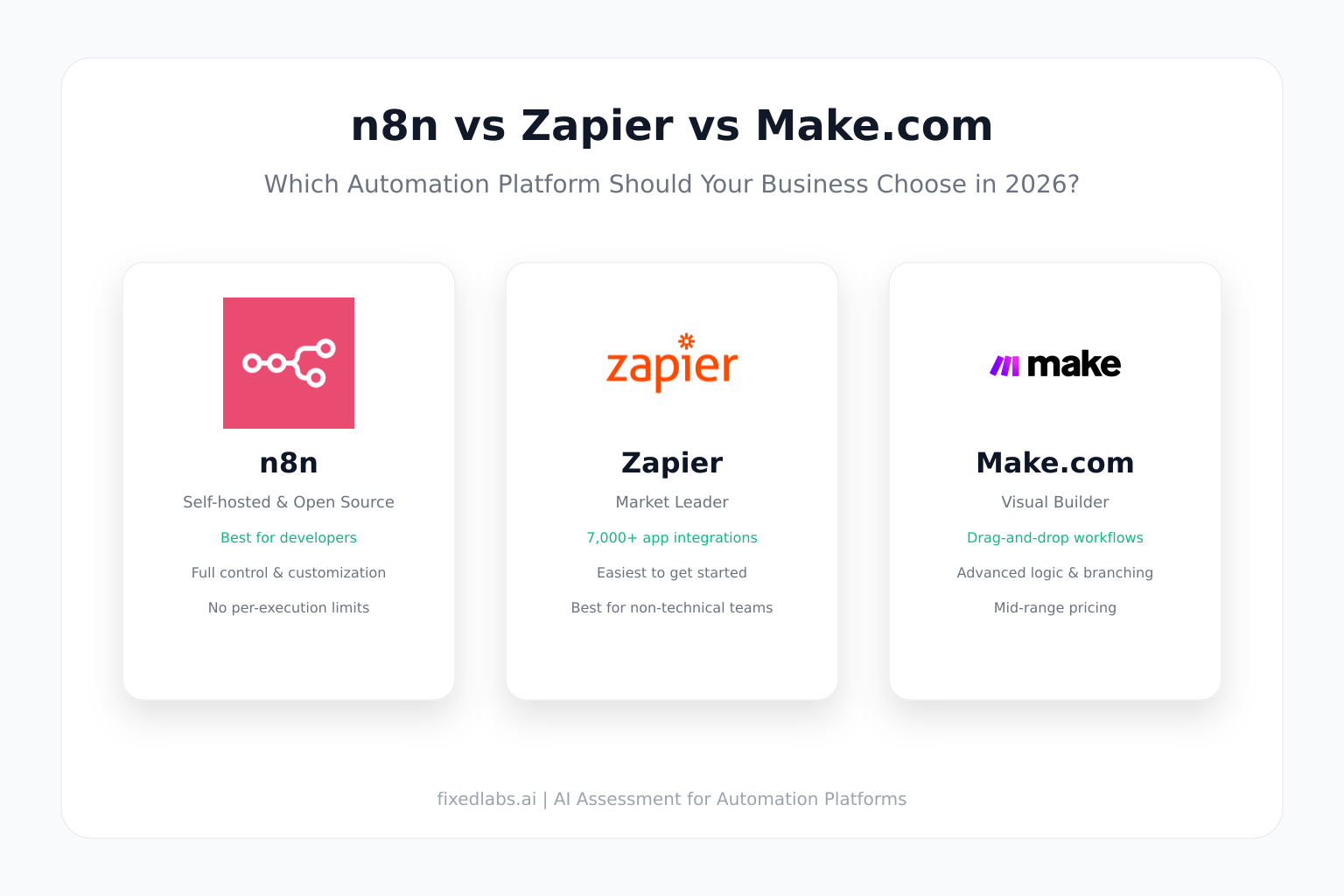
Start With The Workflow Shape, Not The Logo
Most automation comparisons stop at features and pricing. That misses the real decision.
The useful question is not "which tool is best?" The useful question is: which tool lets our team build this specific workflow, understand it six months from now, and keep it safe when volume increases?
This guide compares n8n, Zapier, and Make.com across the dimensions that actually matter for business automation:
- How each platform handles workflow complexity.
- Who can build and maintain automations.
- How pricing scales with volume.
- When self-hosting changes the equation.
- How AI automation fits into each platform.
- What to test before committing to production.
What Each Platform Does Best
| Platform | Best fit | Key strength | Main tradeoff |
|---|---|---|---|
| Zapier | Simple app handoffs, non-technical teams | Largest app directory, fastest setup | Per-task pricing escalates at volume |
| Make.com | Visual workflows with branches and data transformation | Canvas-based editor, granular control | Credit/operation model can surprise teams |
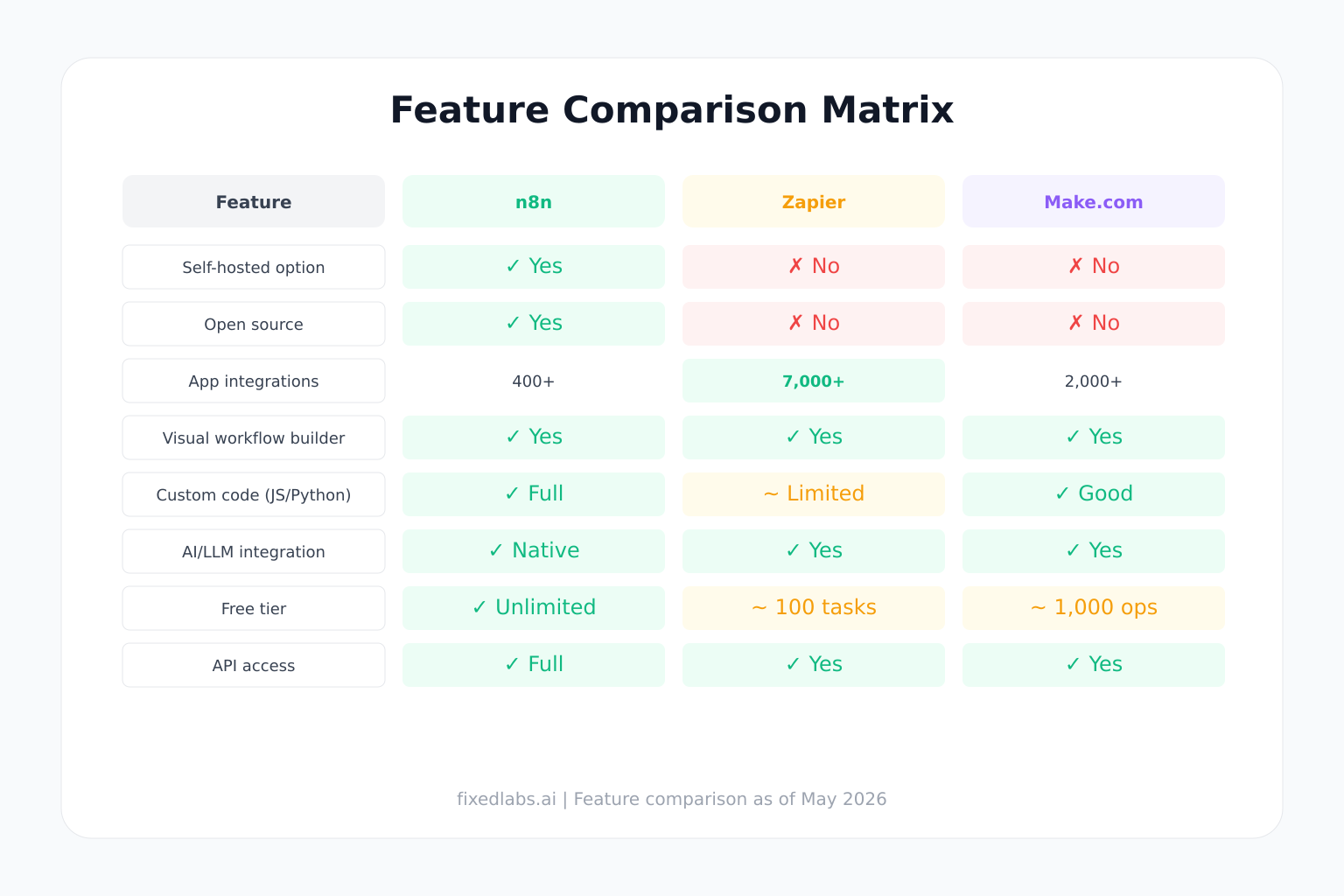
| n8n | Technical teams wanting ownership and self-hosting | Open-source, node-based, execution pricing | Smaller native app directory, steeper learning curve |
Zapier: Speed And Reach
Zapier is built for speed. It helps people connect apps quickly, especially when the automation follows a straight line.
Zapier workflows are called Zaps. A Zap usually feels like a sequence: a trigger starts the Zap, then one or more actions run. That makes Zapier easier for many teams to understand quickly.
Zapier is strongest when:
- The workflow is linear: trigger → action → action.
- A non-technical person owns the automation.
- Broad app coverage matters more than deep control.
- Speed to first automation is the priority.
Zapier becomes expensive when volume increases. Tasks add up fast with multi-step workflows, retries, and error handling. A Zap that creates a CRM contact, sends a Slack message, and logs to a spreadsheet uses multiple tasks per run. At 1,000 leads per month, costs can exceed expectations.
Make.com: Visual Control And Branching
Make.com is built for visibility. It helps people design workflows where data moves through different paths and needs to be shaped along the way.
Make.com workflows are called scenarios. A scenario is built on a visual canvas with modules, routers, filters, bundles, and data paths. That makes Make.com easier to inspect when the workflow becomes less linear.
Make.com is strongest when:
- The workflow has branches, conditions, or loops.
- Data needs cleaning, transformation, or aggregation before reaching the destination.
- A technical operator owns the automation.
- Visual debugging matters for maintenance.
Make.com pricing uses credits and operations. One operation usually equals one credit for non-AI apps, but bundles can multiply operations because each returned record may cause later modules to run again. AI features and advanced modules can consume additional credits.
n8n: Ownership And Self-Hosting
n8n is built for ownership. It gives technical teams control over their automation infrastructure, data flow, and hosting environment.
n8n workflows use a node-based editor. Nodes represent triggers, actions, transformations, and logic. Workflows can include JavaScript or Python code nodes, custom API calls, and self-hosted services.
n8n is strongest when:
- The team wants to self-host automation infrastructure.
- Data privacy or compliance requires keeping workflows on-premises.
- Custom integrations or API connections are needed beyond native app directories.
- Execution-based pricing is preferred over per-task or per-operation models.
- The team has technical capacity to manage infrastructure.
n8n is open-source under a fair-code license. Self-hosting is free, but requires server management, security updates, backups, and monitoring. n8n Cloud removes that burden with managed hosting and execution-based pricing.
The Workflow Shape Test
The shape of the workflow usually matters more than the logo.
| Workflow shape | Better first test | Why |
|---|---|---|
| One trigger, one action | Zapier | Fastest to build and explain |
| One trigger, several simple actions | Zapier | Linear workflows are easy to maintain |
| Lead routing by region, budget, source, urgency | Make.com | Visual routing is easier to inspect |
| One trigger returns many rows needing processing | Make.com or n8n | Bundles and iterators give more control |
| Data must be cleaned before reaching CRM | Make.com or n8n | Better fit for transformations |
| AI output must be reviewed, scored, routed, formatted | Make.com or n8n | Easier to build controlled paths around AI |
| Team needs widest app directory | Zapier | Zapier lists more app connections |
| Team wants self-hosting or data sovereignty | n8n | Only n8n offers full self-hosting |
| Non-technical manager owns workflow | Zapier | Lowest training friction |
| Technical operator owns automation | n8n or Make.com | More control is worth added complexity |
| High-volume workflow with predictable patterns | n8n (self-hosted) | Execution pricing beats per-task at scale |
Pricing: The Real Cost Question
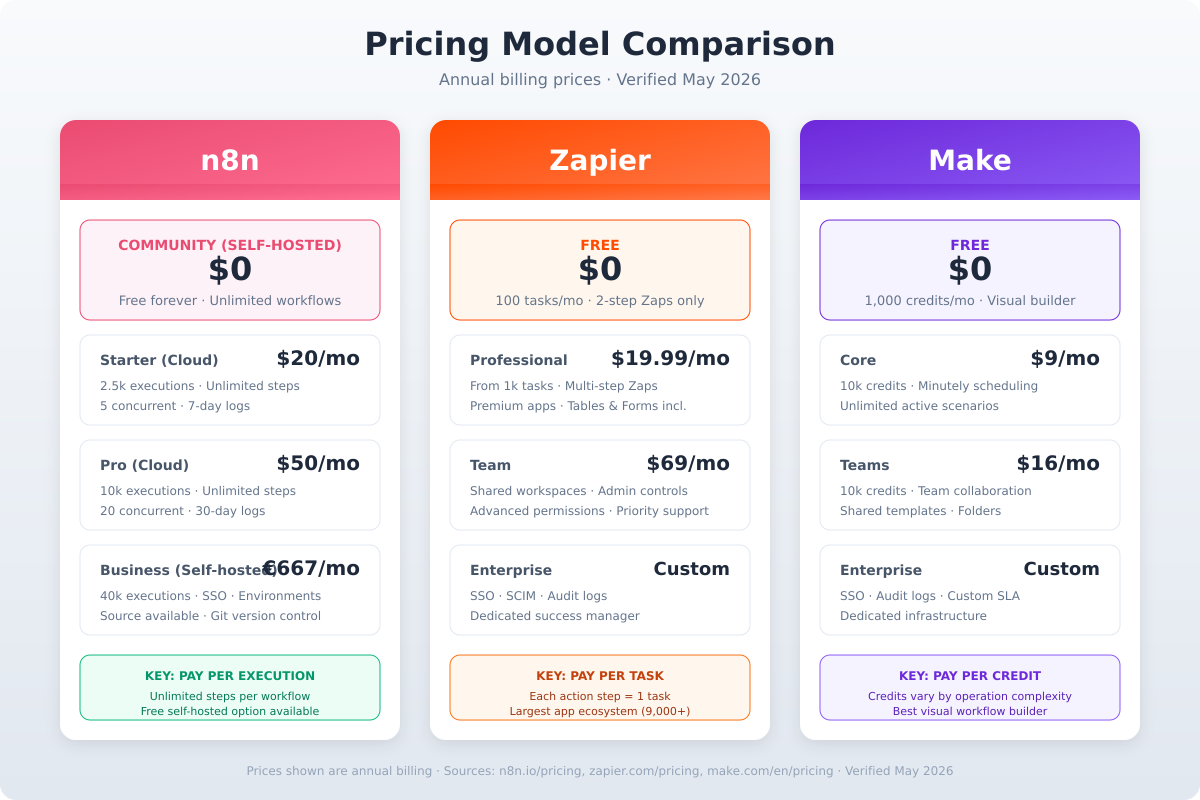
Do not compare monthly plan prices. Compare cost per completed business outcome.
| Platform | Pricing unit | What counts | Scaling risk |
|---|---|---|---|
| Zapier | Tasks | Successful actions in other apps | Multi-step Zaps multiply tasks; retries count |
| Make.com | Credits/Operations | Module runs that process or check data | Bundles multiply operations; AI features vary |
| n8n Cloud | Executions | Complete workflow runs | Fewer hidden multipliers; self-hosted has infra cost only |
Cost Example: 1,000 Leads Per Month
Each lead needs: CRM contact creation, Slack notification, follow-up task creation, and logging.
- Zapier: ~4 tasks per lead × 1,000 = 4,000 tasks/month. May require mid-tier plan.
- Make.com: ~4-6 operations per lead (bundles may multiply) × 1,000 = 4,000-6,000 operations. Credit consumption depends on scenario design.
- n8n Cloud: ~1,000 executions. Execution pricing is typically lower per unit than Zapier tasks at volume.
- n8n Self-hosted: Infrastructure cost only (server, bandwidth, maintenance). Marginal cost per execution approaches zero.
The pricing question is not "which plan is cheaper?" The pricing question is: how much does one completed business outcome cost after records, retries, AI steps, failed runs, and maintenance?
Ease Of Use: Who Can Maintain It?
Ease of use is not only about the first build. It is about who can fix the workflow when a field changes, an app disconnects, or the business adds a new exception.
| Platform | Learning curve | Maintenance profile | Best maintainer |
|---|---|---|---|
| Zapier | Low | Simple Zaps stay simple; complex Zaps get messy | Business users |
| Make.com | Medium | Visual canvas helps inspection; scenarios can overgrow | Technical operators |
| n8n | Medium-High | Node editor rewards technical skill; self-hosting adds ops | Developers or technical ops |
Zapier is easier to start. n8n and Make.com can be easier to inspect when the workflow becomes complex.
AI Automation: Where Each Platform Fits
AI changes the comparison because AI outputs are unpredictable. They need review, routing, cleanup, and structured handling before reaching downstream systems.
| AI use case | Better platform | Why |
|---|---|---|
| Simple AI trigger → single action | Zapier | Fastest path across many apps |
| AI output needs review, scoring, routing | Make.com or n8n | Visual or node-based control paths |
| Self-hosted AI models or custom LLMs | n8n | Full infrastructure control |
| AI agent-like pipelines with memory | n8n | Code nodes and custom integrations |
| AI categorization for support tickets | Any | Depends on volume and review requirements |
Self-Hosting: When It Changes Everything
Self-hosting is n8n's unique advantage. It matters when:
- Data cannot leave your infrastructure (compliance, privacy, industry regulations).
- Volume makes per-task or per-operation pricing prohibitive.
- Custom integrations require direct database or internal API access.
- The team wants full control over uptime, updates, and security.
Self-hosting costs are not zero. Budget for:
- Server infrastructure (compute, storage, bandwidth).
- Security updates and patch management.
- Backup and disaster recovery.
- Monitoring and alerting.
- Staff time for maintenance.
For teams without dedicated DevOps capacity, n8n Cloud or another managed platform may be more cost-effective despite higher per-execution pricing.
Security And Business Risk
All three platforms can be safe or risky depending on configuration.
| Risk | What it means | Safer setup |
|---|---|---|
| Messaging access | Wrong person can tell automation what to do | User allowlists, private channels |
| Tool/API access | Automation can act in real systems | Start with read-only or test tools |
| API keys | Keys can spend money or access data | Scoped keys, rotation, secrets management |
| Customer data | Automation touches sensitive records | Limited permissions, audit logs, approval steps |
| Self-hosted infrastructure | Server misconfiguration exposes workflows | Hardened servers, network isolation, monitoring |
How To Choose: A Practical Framework
- Map one workflow first. Write down triggers, actions, data transformations, error handlers, and volume. Do not start with the tool.
- Score the risk. Does it touch customer data, payments, or production systems? If yes, start in sandbox with human approval.
- Test in the platform that matches the workflow shape. Linear → Zapier. Branching → Make.com. Self-hosted or custom → n8n.
- Measure real cost. Track usage for two weeks at realistic volume. Extrapolate monthly cost including retries and errors.
- Evaluate maintenance. Who will fix it when something breaks? If nobody can maintain it, the cheapest tool becomes expensive.
- Document before scaling. List every trigger, action, connected account, field mapping, owner, and failure path.
Frequently Asked Questions
What is the difference between n8n, Zapier, and Make.com?
Zapier is usually simplest for fast app-to-app automations. Make.com gives more visual control for workflows with branches and data transformation. n8n offers self-hosting, open-source flexibility, and a node-based editor that appeals to technical teams who want ownership over their automation infrastructure.
Is n8n better than Zapier for small businesses?
n8n can be better when a small business has technical capacity and wants to avoid per-task pricing at scale. Zapier is usually better when speed, simplicity, and broad app coverage matter more than hosting control.
Can I self-host n8n for free?
Yes, n8n is open-source and can be self-hosted for free under its fair-code license. However, self-hosting requires server infrastructure, maintenance, security updates, and backup management. The cloud version removes that operational burden.
Which platform is best for AI automation?
All three support AI integrations. Zapier is best for simple AI triggers across many apps. Make.com is best when AI output needs routing, cleanup, or structured handling. n8n is best when you want to self-host AI workflows, use custom models, or build complex agent-like pipelines with full data control.
How does n8n pricing compare to Zapier and Make.com?
n8n cloud uses execution-based pricing with generous free tiers. Self-hosted n8n is free but requires infrastructure costs. Zapier charges per task, which can escalate quickly with multi-step workflows. Make.com charges per operation/credit, with bundles multiplying usage. For high-volume workflows, self-hosted n8n often has the lowest marginal cost.
Can I migrate from Zapier or Make.com to n8n?
Yes, but migration requires mapping each trigger, action, field mapping, and error handler to n8n nodes. Document every workflow before migrating. Start with low-risk automations and test thoroughly before moving production workloads.
Does n8n require coding knowledge?
Basic n8n workflows do not require coding. However, n8n rewards technical users because it supports JavaScript/Python code nodes, custom API calls, and self-hosted infrastructure. Non-technical teams may find Zapier or Make.com easier to start with.
Which automation platform has the most integrations?
Zapier has the largest app directory with 9,000+ connections. Make.com lists 3,000+ apps. n8n has fewer native integrations but supports generic HTTP requests, webhooks, and custom nodes, making it possible to connect to any API.
How Fixed Labs Would Choose
For a client, we would not start with a platform recommendation.
We would start by mapping one workflow, counting monthly volume, scoring the risk, and building a small test in the tool that best matches the workflow shape.
Zapier is often the right first move when the business needs a simple win this week. Make.com is often the right first move when the workflow is already messy and needs a clearer operating system. n8n is often the right first move when the team has technical capacity and wants long-term ownership over automation infrastructure.
Fixed Labs can help identify which workflows are worth automating, estimate the business impact, compare the real tool cost, and build a controlled pilot before automation touches sensitive systems.